After the screenshot app: Kisera for developers who work with AI coding agents.
The first Kisera is the free screenshot app. These are the features we are building next. None of them is in the first version. Plans can change, and we will not give a date or a price until a feature is ready.
An early design
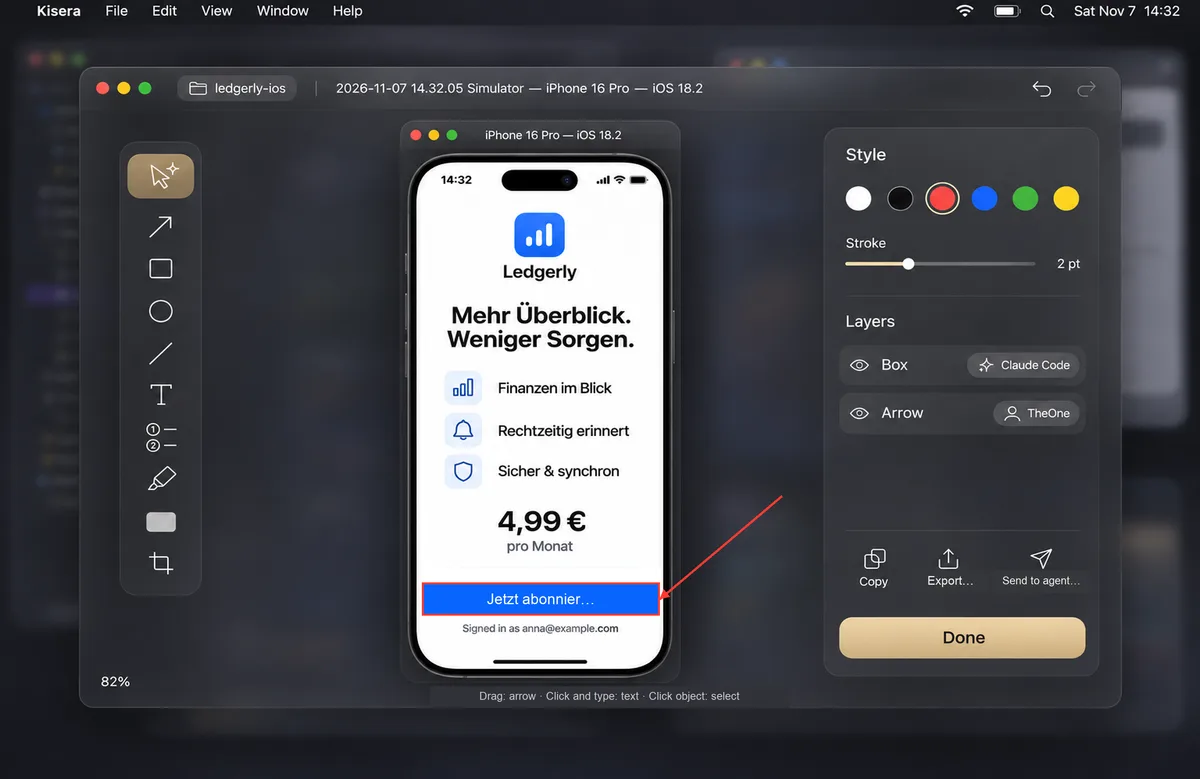
Let your coding agent take screenshots
A coding agent such as Claude Code or Codex asks Kisera for a picture of a window, and the capture lands in your project like any other. You choose which agents may capture, in which projects, and which apps they never picture. Detected keys, tokens and emails are covered before the agent gets the picture.
See what was fixed, before and after
The agent pictures a screen before its change and after it, and asks you to look. You compare the two side by side and click Approve. Nothing counts as approved without your click.
Mark what is wrong
Step through the agent’s pictures, mark what must change right on them, and send your marks back. The agent reads them as its to-do list.
Picture every screen
Picture one screen of your app in Apple’s iPhone Simulator in every device, language and appearance you list, with likely cut-off text flagged.